

Alpha v0.16.0
A much more compact node design, inserting a node onto an existing connection, explanations for invalid connections, sharper previews, and DDS support on Windows.
Major UI improvements
The first thing you might notice in this version is a bit of a redesign. Nodes have been majorly overhauled to be much more compact. While it might be a bit of a shock how different it looks at first, I guarantee you'll quickly get used to it and prefer this new look. The compactness of the nodes gives you much more space to fill out your chains with, and there is just a lot less wasted space overall. Check out this comparison of the space used by the old vs the new nodes:
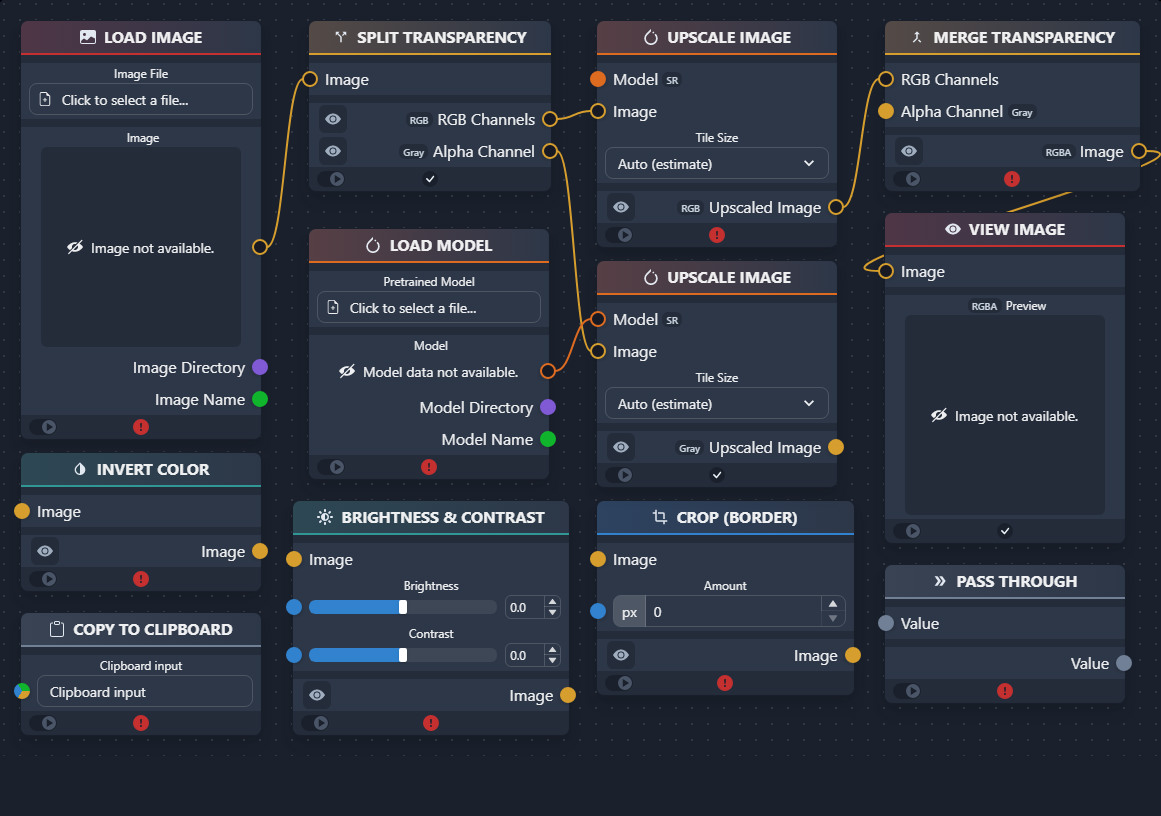
With this compactness change also came a change to sliders. In my opinion, they are now a lot easier to see and interact with, and are closer to something like you'd see in blender.
There have also been changes to pop-up boxes. Settings had a bit of an overhaul to fix some scrolling issues, and all pop-ups now have a darker color. Alerts also got icons representing the type of alert.
Node-on-Connection insertion
Something we all have always wanted in chaiNNer was the ability to insert a compatible node in-between two connected nodes, without having to delete the connection and make two new ones. Well, now this is a reality. All you have to do is hold alt while dragging a node in the editor, and both the node and the connection line will visually show you that the node is able to be connected this way. It's really convenient to be able to insert nodes into existing chains this way, and can save a lot of time.
Informing you about invalid connections
The UI now will inform you when a connection you are trying to make is invalid. Before, we would tell you why a node was invalid after it was already connected and then made invalid. However, we had never explained why some connections were not possible to begin with. This had confused many users as they would try to do things like connect a GFPGAN model to Upscale Image and think there was something wrong rather than it being something intentional. While the UI would not let these users make that connection, it would not tell them why. This update adds an explanation tooltip that explains why a connection can't be made as you attempt to drop the connection on a handle. This should hopefully improve the user experience and lead to less confusion when this happens.
Increased View Image preview resolution
View Image just became a lot more useful. Now, instead of seeing only a 512x512 preview of your image, you will see a maximum of 2K resolution when zoomed in to the max. This still isn't ideal for extremely large images (larger than 2k) where you need to zoom in even more than chaiNNer allows, but a feature for that will be coming in the future. For now, this is a huge improvement and makes in-line previewing much much better. We also improved the performance of the node, so you may notice previews loading a bit faster than they used to.
Better DDS Support (Reading & writing, Windows only)
With this update, previously unsupported DDS textures files can now be read and written on Windows. We make use of Texconv, which is a small texture utility that we now bundle with chaiNNer. Unfortunately, Textconv is Windows-only, meaning Linux & MacOS users will not be able to take advantage of this. But we figured it was still better to have it than not.
Originally posted in the chaiNNer Discord, which you can still join.
Release notes for v0.16.0 on GitHub →← All posts