
chaiNNer
A node-based editor for image processing pipelines.
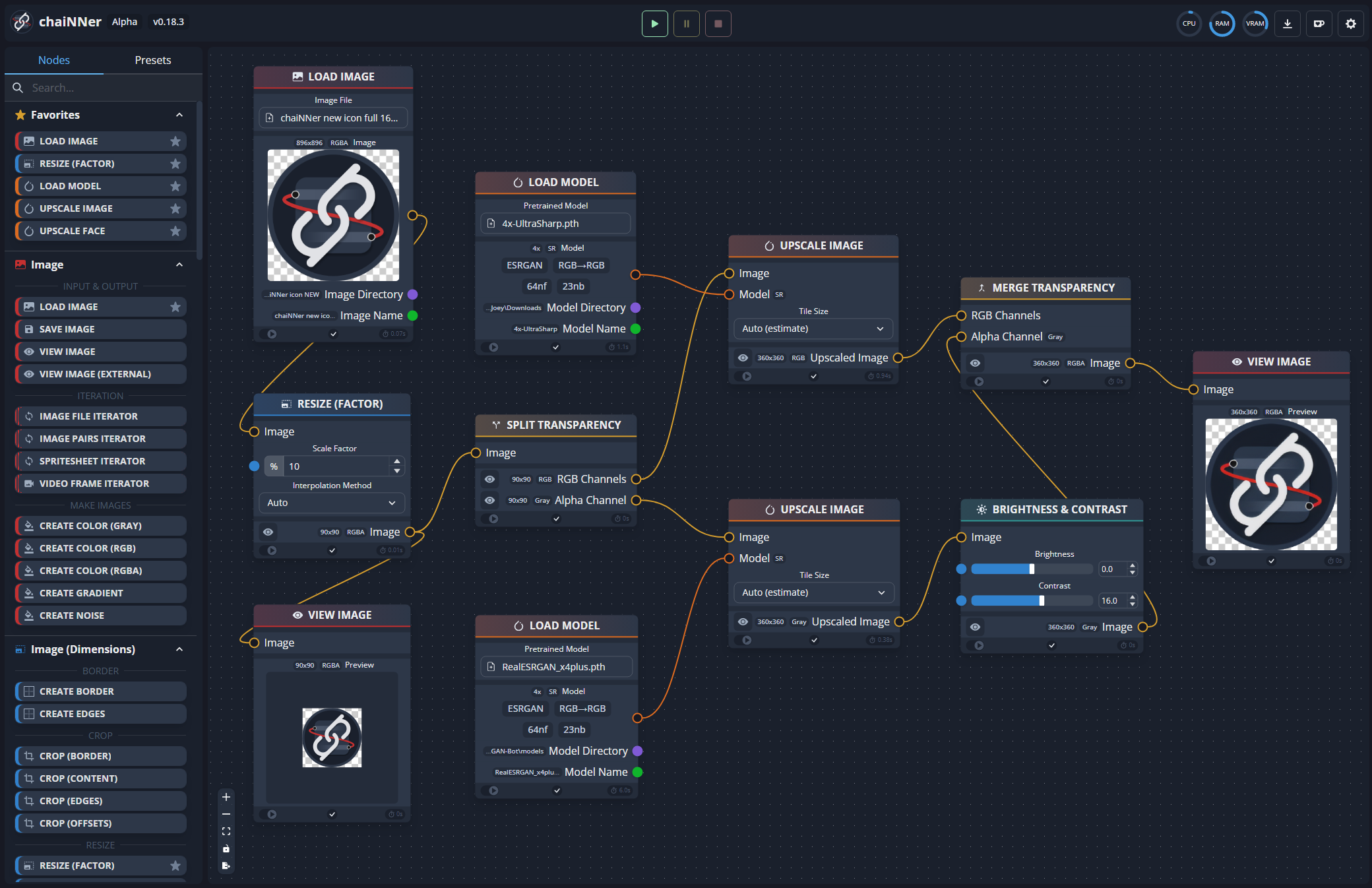
Drag nodes onto a canvas, connect them, and press run. Free and open source, for Windows, macOS, and Linux.
What it is
chaiNNer is a desktop editor for building image processing pipelines. Instead of writing scripts or clicking through menus, you drop nodes onto a canvas and connect them. Each node does one thing: load an image, upscale it, resize it, remove the background, save it. You decide how they combine.
It was originally written for AI upscaling, and that is still what most people install it for. There is a large library of community-trained super-resolution models, and chaiNNer runs them through PyTorch, NCNN, ONNX, or TensorRT. It has since grown into a general-purpose image editor: color work, blending, format conversion, batch runs, and video frames.
What you can do with it
Upscaling
Load a super-resolution model and run it on an image. Spandrel, the architecture-support package chaiNNer maintains, covers ESRGAN, SPAN, OmniSR, and dozens of other architectures, and most of the models people use come from OpenModelDB. Upscale Face restores faces with a dedicated model on the way through, and Average Color Fix and Wavelet Color Fix pull the color back where the model drifted it.
Textures and normal maps
Normal Map Generator builds a normal map from a diffuse texture. Add Normals, Scale Normals, and Balance Normals combine and correct them, and Metal to Specular converts between PBR workflows. Save Image writes DDS with BC1, BC3, and BC7 in sRGB or linear, with mipmaps, plus the two-channel BC5 formats that pair with the normal map nodes. Split Spritesheet takes a sheet apart, the chain runs on every tile, and Merge Spritesheet puts it back together.
Pixel art
Resize Pixel Art upscales with HQ2x, Eagle, and AdvMAME instead of a model. Palette from Image extracts a palette that Apply Palette and Dither (Palette) consume, and Quantize to Reference re-quantizes an upscale using colors sampled locally from the original rather than globally.
Editing
Color Levels, Brightness & Contrast, Hue & Saturation, and Gamma cover the usual corrections, with Stretch Contrast for automatic levels. Unsharp Mask and High Boost Filter sharpen, while Gaussian, box, median, surface, and lens blur soften. Resize by ratio or to a target side length, crop to the visible content or strip a flat border, then Pad, Rotate, and Flip. Blend Images lays an overlay onto a base with the usual modes: normal, multiply, screen, and overlay.
Combining nodes
Branch on a condition
Compare tests two numbers, Logic Operation combines the results, and Conditional passes one of two inputs through based on that. The branch that isn't taken never runs, so a chain can read a size with Get Dimensions and skip the upscale on images that are already big enough.
Run a chain over a sequence
Load Images points at a folder, Load Video at a clip, Load Models at a folder of models, Range at a span of numbers. Each one turns everything downstream into a loop. Save Image collects the results at the other end, Save Video re-encodes frames into H.264, H.265, VP9, or lossless FFV1, and Merge Spritesheet reassembles a sheet. Running one image through every model in a folder, each output captioned with the model it came from, is about five nodes.
Compute values
Math adds, multiplies, and takes logs, minimums, maximums, and moduli, with Round and Percent for the rest. Get Dimensions reads width, height, and channel count back out of an image. Together they let a chain size its own output instead of you typing a number.
Build text and filenames
Text Pattern assembles strings out of other values and Regex Find pulls fields out of them. Save Image takes its filename as an input, so output names can be built from the input name, the model name, or anything else in the chain.
How it works
A chain does the things you would otherwise write a script for: run a model, loop over a folder, branch on a condition, build output names. In chaiNNer you connect nodes instead, and the graph is the whole program. There is no layer of code beneath it. A three-node chain of load image, upscale, save is about the simplest thing you can build, and a twenty-node chain is not much harder.
1
Drag a node in
Pick one from the node list on the left, or right-click the canvas. There are hundreds: loaders, savers, processors, models, utilities.
2
Connect the handles
Every handle has a type and a color. chaiNNer only allows connections that make sense, and shows you which handles are compatible while you drag.
3
Press run
The connections light up as data moves through the chain. You can pause or stop at any time, and errors appear on the node that caused them instead of after ten minutes of processing.
Under the hood
- GPU frameworks
PyTorch: CUDA on Nvidia, ROCm on Linux AMD, MPS on Apple Silicon.
NCNN: AMD, Intel, Nvidia, and Apple. Covers hardware PyTorch does not.
ONNX: Broad model support, including background removal networks.
TensorRT: Fastest on Nvidia, once the model has been converted.
All of them fall back to the CPU.
- Python
On first launch chaiNNer downloads an isolated Python build into its own folder and manages dependencies through a built-in Dependency Manager. You can point it at a system Python instead if you prefer.
- Command line
Saved chains can be run from the command line, so chaiNNer can be one step inside a larger pipeline.
- Type checking
Every node input has a type. The editor validates the chain as you build it and refuses connections that would fail at run time.
Open source
chaiNNer is a hobby project under the GPLv3 license. There is a small group of maintainers, a number of contributors, and a Discord where people share chains and models. Bug reports go in GitHub issues, and if you know TypeScript, React, or Python, pull requests are welcome.
There is a Ko-fi if you want to support the project. Nothing is gated behind it.
Get it
Installers and portable builds for Windows, macOS, and Linux. chaiNNer sets up its own Python environment the first time you open it.